Monday, December 10, 2007

Four styles of HDTV

Once upon a time, when only analog, tube TVs were around, buying a new set used to be a whole lot less of a nerve-racking experience. Now, there are all sorts of questions. Do you go wide or not? Is LCD better than plasma? And what's the difference between rear-projection LCD, LCoS, and DLP HDTVs? If all the tech jargon has you confused, don't worry. Read our guide to the pros and cons of high-tech TVs, and you'll feel a whole lot more confident when you hit your local electronics store.

Direct-view (tube) TVs

Direct view is how industry insiders refer to any television that doesn't use projection technology. Many of them are the familiar tube TVs you see everywhere--they're called tubes because the glass forms the business end of a cathode-ray tube (CRT). Direct-view tube TVs can be found in sizes up to 36 inches (diagonal), and as their screen sizes increase, so do their heft and depth. Sony's 34-inch KD-34XBR960, for example, tips the scales at nearly 200 pounds, measures 24 inches deep, and requires a minimum of two--and probably three--burly guys to lift it onto a stand. Because of size and weight issues, it doesn't pay for companies to make larger tube TVs; they simply aren't practical.

High-end tube TVs can give a great-looking picture. CRTs are still the kings of black level, a term used to describe the quality and the depth of black, the darker the better. Direct-view tube sets look good from any angle, so unlike flat-panel LCDs and rear-projection sets, the picture quality doesn't change depending on where you sit. Compared with newer TV technologies, however, direct-view sets often look softer with high-definition material because they can't deliver as much detail. Most tubes won't accept high-resolution PC sources. Also, tubes suffer from more geometry errors than do flat-panel sets, which can make straight vertical and horizontal lines appear to bend onscreen.

New developments

Flat vs. curved screens: The traditional curved shape of the glass tube is giving way to completely flat glass. Sony introduced flat tubes first with its Wega televisions, but now, just about every manufacturer sells some kind of flat-tube TV. Flat glass not only looks more high tech, it collects less ambient light from the room and, therefore, helps to reduce glare. But it's a myth that flat tubes result in straighter lines; they can have the same geometry problems as their curved counterparts, especially near the corners and the edges of the screen.

Digital vs. analog: Many tubes are still entirely analog, meaning that they won't work with high-definition tuners or progressive-scan DVD players. An increasing number of direct-view tube TVs, however, can display high-definition sources. These sets still use the tube, an inherently analog display technology (unlike plasma, LCD, DLP, and the rest; see the following sections), but if they can accept and display high-definition and progressive-scan images, they qualify as honest-to-goodness HDTVs.

Wide-screen 16:9 vs. standard-screen 4:3: For the strongest theatrical impact, the majority of movies and HDTV shows are filmed in the wide-screen format, where the screen is much wider than it is tall. Regular televisions and most standard-definition TV programs use a narrow-screen, 4:3 aspect ratio, which refers to the width of the screen compared to its height. Newer TVs--especially HDTVs--almost always have screens with a much wider ratio: 16 units of width for every 9 units of height, which translates to a 16:9 aspect ratio. Wide-screen, direct-view TVs cost more than 4:3 models for the same amount of screen real estate, but they're great if you watch a lot of DVDs or HDTV.

Thin tubes: Some TV makers are coming out with so-called thinner tubes that are much shallower than standard tubes of the same size. Samsung's TX-R3093WH is a good example: its depth measures just 16 inches, which is about 6 inches shallower than a typical 30-inch wide-screen tube TV. While that depth is definitely thinner than usual, it's certainly not flat.


Source: http://www.cnet.com/4520-7874_1-5108443-1.html?tag=txt

Connected Home 2007 Holiday Buying Guide

Just like that, the holiday season is upon us once again. This year, I'm going to take a slightly different approach to my annual holiday buying guide, giving you fewer specific recommendations and more useful discussions about the technologies you’ll likely be considering this year. The result, I hope, will be a more valuable guide than a simple list of products, and one you can refer to again and again.

Top Gifts of the Year


First, I'd like to highlight two unique gifts that don't fall neatly into any specific product categories but are regardless my choices for the best holiday gifts of 2007. Why single out two products, you ask? Although the holiday season has been contorted into a frenzy of mindless consumer spending, it's also an opportunity to take stock and do things a bit differently. Neither of these gifts is particularly thrifty, but both have the potential to change the world, albeit in small and different ways.

Amazon Kindle


What It Is: A portable e-book reader with a free 3G wireless service


Pros: Highly portable; gorgeous and highly readable E-Ink screen; economical content options


Cons: Expensive up-front cost; no color option


Why You Want It: Come on, you know someone who doesn't read enough

At $399, Amazon's new e-book reader might seem a bit expensive, but consider how much more useful and powerful this device is than previous e-book solutions. In addition to its paperback-book form factor and gorgeous E-Ink screen technology, the Kindle is backed by Amazon's free Whispernet wireless service, which lets users browse and buy a collection of almost 100,000 electronic books, along with several national and international daily newspapers and magazines. The service uses 3G wireless technology to download new content as needed, so new magazine issues arrive each morning at 3am., for example, and are ready for your morning commute. What Amazon really got right, however, was the content: In addition to a massive library that dwarfs those offered by the competition, Amazon also prices content correctly. Best sellers are just $9.99, much less expensive than their paper counterparts, and other books typically cost even less. Newspaper and magazine subscriptions—unique to the Kindle, incidentally—are a bargain as well: While a monthly subscription to The New York Times runs over $40, you can get the same content delivered to your Kindle for just $12.99 per month. That's how electronics economics are supposed to work.

As for the device itself, the Kindle has been unfairly criticized for its utilitarian, button-heavy design. Don't be fooled: The Kindle is all about the reading experience. As is the case with a physical book, you’ll easily find yourself lost in whatever you're reading, which is how an e-book reader should work. My family has been using a Kindle for weeks now, and the only problem we've had is that everyone wants to use it so much. My wife and I have subscribed to a number of periodicals, which we enjoy over morning coffee, and we've both read several books on the device already. Even our nine-year-old son has gotten into the action, downloading an Encyclopedia Brown book for himself.

And heck, how can you quarrel with a device that promotes reading? In this age of the insular, headphone-wearing, Tinitus-suffering iPod nation, the Kindle is a throwback to a more intellectual form of entertainment. Highly recommended.

OLPC XO Laptop


What It Is: A small laptop specifically designed to help children become computer literate


Pros: You're doing the right thing, and it’s relatively inexpensive


Cons: Completely incompatible with any software you'd actually want to use


Why You Want It: It's chic and hip, and you can actually help make a difference

If you're geek-leaning and looking to make a difference in the world, look no further than the One Laptop Per Child (OLPC) XO laptop, a portable computing device that's aimed at underprivileged children in developing countries. For a limited time only—the offer ends December 31—consumers in the United States and Canada can purchase an XO laptop for themselves and donate a second laptop to a deserving child. The total cost of this purchase is $399—half for the laptop you'll receive and half for the donation—and what you'll get in return, aside from the charitable donation itself, is an innovative and rugged little machine that small children should really get a kick out of.

The XO laptop is a cute little green laptop with rubberized keys, a small screen, rabbit-ear wireless antennas, and a new UI designed specifically to facilitate learning. Everything on the XO is open source, and although you won't be running Windows on this thing any time soon—let alone Windows applications—the onboard software includes a Web browser, a word processor, and other familiar tools.

If you aren’t interested in actually purchasing an XO laptop, think about donating one. Your donation is tax-deductable, and you can't beat the feel-good nature of such a gift.

HDTVs and Movies


HDTV is all the rage these days, and this year you have more economical and high-quality choices than ever before. Whereas an HDTV set might have been a luxury item just a few short years ago, today you'll have a hard time purchasing a non-HDTV set. With the major networks switching to all-digital and HDTV signals across the board, you're going to want an HDTV set to take advantage of the high-quality signals that are now being delivered via all cable, terrestrial, and satellite providers.

Getting Past the Technobabble


The problem with HDTV is that there's an alarming amount of technological know-how necessary to make the right buying decision. With that in mind, I'd like to highlight some terms and technologies you should be familiar with before heading off to the store.

First, let's talk about the technical aspects of the display. All HDTVs will support a subset of the full range of possible TV resolutions, which are rendered in a mix of progressive and interlaced methods. A progressive display is one in which the lines that make up the TV display are rendered all at once in sequence. This creates a steadier picture than an interlaced display, which is rendered in alternating lines. A set that supports a progressive display at a given resolution will also support an interlaced display at the same resolution, although the reverse isn’t true. Put simply, progressive is superior to interlaced: Progressive displays are flicker-free and visually steadier to the eye. Shoot for progressive over interlaced wherever possible.

HDTVs also support a range of resolutions, similar to the way computers do. These include the following:

Standard definition (SD) and enhanced definition (ED). Available in both progressive and interlaced versions, SD signals are often referred to as 480p and 480i, respectively. This resolution is considered DVD-quality; a typical DVD will display at a maximum resolution of 720x480 pixels. However, don't be too impressed by it. A typical DVD or other SD video source (like a non-HDTV television station) offers less than one-quarter the resolution and quality of the lowest-end HDTV display. ED sets exist in a weird middle ground between SD and true HDTV, offering 960x540 resolution; they should be avoided as the stop-gap solutions they are.

720p. This progressively displayed HDTV signal is currently the standard for HDTV television, offering excellent quality. The resolution is 1280x720.

1080i. Although offering a higher 1920x1080 resolution than 720p, 1080i is rendered in interlaced fashion and is thus often less enjoyable to watch than 720p signals. If your choice is between a 720p and 1080i set, the latter of which is increasingly less common, pick 720p.

1080p. The so-called "full HD" experience offers 1920x1080 resolution (like 1080i) but is progressively rendered, offering the best quality and a rock-solid picture. There is currently very little 1080p content available on TV, but new DVD-like disc formats such as Blu-ray and HD DVD both utilize this format, and the results are absolutely stunning. Currently, the combination of a 1080p display and a Blu-ray or HD DVD player is the best possible picture available on HDTV. It has to be seen to be believed.

Making the Connections


Another consideration is connections. Every HDTV will come with a certain number of connectors, by which you will connect the display to other devices, such as cable boxes, video game systems, disc players (DVD, Blu-ray, HD DVD), and so on. Connections are simple: The more the better. But you need to know what types of connections are available, and which are the most valuable. Here they are:

HDMI. Currently the top-of-the-line connection type, HDMI is all-digital and supports both audio and video through a single cable, so it's great for cable management and simplicity. HDMI also supports all SD and HDTV resolutions and formats, and it can work with up to 7.1 surround sound if you funnel it through the appropriate receiver. HDMI is the most desirable connection type on an HDTV.

Component. This connection type consists of multiple cables—blue, red, and green cables for video and red and white for audio. It supports all standard definition and HDTV resolutions and formats, and is thus on par with HDMI from a quality standpoint. The trade-off is cable management: A component-cable set is often a mess of similar-looking cables, and it's easy to make mistakes. That said, component is still a lot more common than HDMI and it's not unusual to find HDTV sets with multiple component connections. If you can't go HDMI, component is your next best bet.

VGA/computer. Some HDTV sets support a VGA-style connection, which you might be familiar with from the computer world. This analog connection type can often support up to 1080p, so it could be valuable option, but some set makers include lower-quality ports that offer only a subset of the available HDTV resolutions, so you'll need to check on a set-by-set basis. VGA is also video-only, so this connection type is usually accompanied by a pair of composite audio ports for sound. A digital version of VGA, called DVI, is rarely seen but is a possibility as well.

Composite/S-video. The old-fashioned RCA-style composite ports are useful for older devices such as VHS players but don’t support HDTV resolutions. These connection types include three cables: red and white for audio and yellow for video. Alternatively, a slightly better quality video connection called S-video is often available as well. S-video is better than straight composite, but not by much, and none of these connection types offer particularly high quality.

My recommendations here are simple: Get as many HDMI connections as possible. Component connections are almost equally valuable, although you'll have to deal with masses of wires. And composite connections will be viable for some time to come, thanks to the millions of existing consumer electronics devices out there that still use these outmoded connections.

Set Types


When you walk into a typical electronics retailer, the first thing you're confronted with is a wall or room full of different displays and display types, all spasmodically vying for your attention. With the assumption that the days of tube TVs are over, mostly because it's not economical to sell such sets at sizes over 36", we'll focus on the present and future here instead. In general, there are three types of HDTV displays to consider these days.

Plasma


What It Is: A flat panel HDTV display


Pros: The largest HDTV sizes possible; best display quality


Cons: Can be incredibly expensive at large sizes; uses more power than LCD; burn-in still possible


Why You Want It: Plasma offers large screen sizes, deepest blacks, best contrast, and excellent viewing from any angle

Plasma is currently the top dog in the HDTV world, thanks to huge screen sizes, excellent picture quality, and wide viewing angles. Plasma displays, like LCDs, have proven to be incredibly reliable, and although the devices are heavy, they’re relatively flat and can be wall-mounted. On the other hand, plasmas expend more energy than LCDs and need ventilation: Expect to see a number of fans on the back of any plasma display, though you should never hear them in normal operation. Plasmas are typically sold in the 42"-to-50" range.

LCD


What It Is: A flat panel HDTV display


Pros: Thinner and lighter than plasma; no burn-in


Cons: Screen sizes are smaller than is possible with plasma; narrow viewing angle; often more expensive than plasma for larger screens; bright screens can lead to eye strain


Why You Want It: Typically lighter and more energy-efficient than plasma

When you look at HDTVs in an electronics store, don't be fooled by the often overly bright LCDs you'll see there: Although these displays might look impressive in the store, they can often lead to eye strain after prolonged viewing. That said, LCDs do offer some advantages over plasmas. They're often much less expensive at smaller sizes (although the reverse is true on the upper end of the size range) and weigh much less. LCDs offer a narrow viewing angle, however, and are best used in smaller rooms. Sizes range from 23"-to-42", typically.

Rear Projection


What It Is: A big-screen TV that offers lower prices but a larger form factor


Pros: Huge screen sizes; much less expensive than flat-panel displays


Cons: Sets are typically huge and take up much more space than flat-panel displays; viewing angle is narrow; bulbs need to be replaced periodically


Why You Want It: Best bang for the buck, especially if space isn't a concern

Available in sizes ranging from 50" to 65", rear-projection sets are your best bet when you absolutely need the biggest possible screen. The downside is that rear projection sets aren't flat-panel devices such as LCDs and plasmas, so you'll pay a bit in depth: Most rear-projection sets are a foot or two deep. You'll also need to periodically replace the set's display bulb, and viewing angels are narrow. Repair rates for rear projection sets are much higher than those for LCD and plasma.

Finally, pay attention to reviews. Consumer Reports is particularly valuable in this regard, as are CNET's admittedly repetitive but useful HDTV reviews.

Next-Generation DVD and Movies DVD sales have sailed along solidly for a decade, thanks to movie-industry back catalogs and the move to TV boxed sets in recent years, but this format is starting to show its age. As noted above, DVD movies top out at a 720 x 480 SD resolution and really can't do much to take advantage of modern HDTV displays. Fortunately, there are new HDTV disc formats available now that can do so, as well as various options for getting the most out of your existing DVD collection. You could also skip the next-generation DVD formats altogether and move directly to digital movies, although that's not quite viable here in late 2007. We'll get there.

Upconverting DVD Players


If you have an HDTV, one excellent and obvious upgrade is available to you: an upconverting DVD player. These devices, which typically cost well under $100, basically take the SD image from a DVD movie, de-interlace it, then scale it up to the native resolution of your HDTV. This process isn't magical—it can't turn an SD DVD into a true HDTV movie—but it usually does offer very real and noticeable improvements to the display of the movie.

Upconverting DVD players are available as standalone devices, but if you own a Microsoft Xbox 360 or a Sony PlayStation 3, you already own one: Both devices can upconvert standard DVDs to HDTV formats, although in my tests the Xbox 360 does a much better job. And that's the potential concern with upconverting: Not all upconverters work equally well.

High definition DVD


Sadly, the move to next-generation DVD formats is marked by some controversy: Rather than settle on a single standard, competing camps in the electronics industry are offering up two rival formats, Blu-ray and HD DVD, creating a format war the likes of which we haven't seen in two decades. There's no clear winner here, which makes both formats somewhat less interesting than DVD, but with rapidly dropping prices and excellent display quality, both are still compelling, especially for movie buffs. What could end this stalemate, of course, is a combo player that supports both formats, and those players are just appearing on the scene at high prices. Here's what's available and reasonably priced now:

Blu-ray


What It Is: A high-definition DVD format


Pros: Stunning HD display up to 1080p; slick interactive menus; players are DVD-compatible; offers more storage than HD DVD


Cons: Players and content are currently expensive; incompatible with HD DVD


Why You Want It: Unclear

HD DVD


What It Is: A high-definition DVD format


Pros: Stunning HD display up to 1080p; slick interactive menus; players are DVD-compatible; currently a bit less expensive than Blu-ray


Cons: Incompatible with Blu-ray


Why You Want It: Unclear

Blu-ray players are currently quite expensive, with devices currently in the $500 range and up. Oddly, one of the most economical Blu-ray players is the $399 PlayStation 3 video game console; coupled with an optional $20 Sony remote, this nearly silent device is an ideal movie player. Blu-ray's biggest technical advantage over HD DVD is the capacity of its discs, which currently top out at about 50GB, compared with 30GB for HD DVD. However, this difference is unlikely to result in any real-world advantage for consumers.

Anything can happen, but Blu-ray players and discs are currently outselling those from the HD DVD camp by a wide margin. And Blu-ray seems to have better industry support than HD DVD—an important point for movie fans: Currently, 20th Century Fox, Disney, Lions Gate, MGM, Sony, and Warner Bros./New Line all support Blu-ray, whereas Dreamworks Animation, Paramount Pictures, Universal, and Warner Bros./New Line support HD DVD. Dreamworks Animation and Paramount recently announced that they would support HD DVD exclusively, if only for a limited time.

In HD DVD's defense, HD DVD hardware is considerably less expensive than Blu-ray, and with $200 devices on the market now, it's possible that this holiday season could see a switchover to HD DVD dominance. Only time will tell, but for now, one thing is certain: Neither format is a clear winner.

One final note: The Sony PlayStation 3 supports Blu-ray out of the box, as mentioned above. Xbox 360 owners can purchase a $150 external peripheral for playing HD DVD movies via that console. Because both the PlayStation 3 and Xbox 360 offer HDMI-based 1080p output, these solutions are enticing to anyone interested in both video gaming and movie playback. However, the Xbox 360 has some serious advantages for digital content delivery, including the ability to download HD movies and TV shows via the Xbox Live service.

More Home Theater


If you're thinking about giving next-generation DVD formats another year, you're in good company. Fortunately, there are many other ways to enjoy high-quality home-theatre-style entertainment, including a number of set-top boxes that seek to bring your PC-based content into the living room.

Apple TV


What It Is: An HDTV front-end for your iTunes music, movie, and photo collections


Pros: Simple setup and use; small and elegant hardware; supports wired and wireless networking


Cons: Works only with Apple software and service; a bit expensive


Why You Want It: Your iTunes collection will never look or sound so good

The Apple TV ($299 and up) is a stylish and tiny set-top box that supports HDMI, component, and composite connections to your HDTV and drives resolutions up to 1080i. The Apple TV uses wireless (802.11b/g) or wired Ethernet networking technology to connect to iTunes back on a PC or Mac elsewhere in your home. You sync or stream content to the device, including photos, music, and videos, and the device natively supports iTunes-based movie previews and YouTube content as well.

Here's a secret: Although the Apple TV is a great solution, you can actually get much of the Apple TV's functionality with a modern iPod ($149 to $500), an Apple docking station ($29), an Apple remote control ($19), and a set of component video cables ($45). What you miss with this setup is the onscreen menus—you'll need to directly access the iPod interface to select content. But if you already have an iPod, this is an interesting solution. We'll look at iPods and other portable media players in part 2 of this guide.

Media Center Extender


What It Is: An HDTV-capable set-top box that brings the Vista Media Center experience into your den


Pros: Elegant UI; works with movie rental services and music subscription services


Cons: Can be expensive; requires a Vista-based Media Center PC; best feature requires a TV connection to the PC


Why You Want It: It's the ultimate PC-to-living-room device

Microsoft's hardware partners will soon unleash a variety of dedicated Media Center Extender devices, but as of this writing, the only one on the market is Microsoft's own Xbox 360, which features Media Center Extender functionality in addition to its normal video game playing capabilities. A Media Center Extender brings Vista's beautiful Media Center interface to your HDTV, over the network, allowing you to access live and recorded TV shows (assuming you've connected your PC to a TV source), digital music, photos, and videos, as well as online services that provide rented and purchased movies and TV shows, as well as subscription music services. This is the full meal deal, and while these solutions can still be a bit complex, it's the way to go if want it all (and aren't married to Apple's way of doing things.)

There are other digital media receivers available too, of course. Dedicated digital media receivers tend to offer weaker UIs than the Apple TV and Media Center Extenders, but they can often support more media formats. My satisfaction with such devices has been mixed, however, so be sure to research any device before buying. It's often impossible to improve the compatibility of these devices after the fact.


Source: http://www.connectedhomemag.com/Networking/Articles/Index.cfm?ArticleID=97784

Sunday, December 9, 2007

Apple calls the tune in mobile music

In December 1942, Bing Crosby’s White Christmas blared out from a simple gramophone. Now, instead of huddling around a phonograph, music fans are downloading the seasonal favourite on to their mobile phones.

The change owes mainly to the arrival of the Apple iPhone, which has set off an avalanche of traditional mobile phone operators into the music market. They fear that a vital source of revenue could be seized from under them.

The market has huge potential: consumers could be spending as much as $32 billion (£15.5 billion) a year buying music on their handsets by 2010, analysts believe. And the success of the iPhone - Orange sold 30,000 in five days – has served to focus Vodafone and its rivals on trying to snare a chunk of the revenue.

Paolo Pescatore, director of operator strategy at CCS Insight, the telecoms research group, says: “The awareness of the iPhone as a device, and its powerfulness, has forced the mobile companies to react and consider their own initiatives.”

In September Vodafone, the world’s biggest mobile company, offered subscribers access to a vast catalogue of music for less than £2 a week. It dubbed the service, which lets consumers download the latest tunes regardless of their location, a “completely new movement within mobile music”.

Last week Nokia, the world’s biggest mobile manufacturer, went further by promising buyers of its handsets free access to millions of songs for a year. One analyst described the service, offered jointly with Universal, as a potential “game changer”.

Meanwhile, a study by Informa Telecoms & Media found that both the mobile operators and the music industry were “staking much of their future in this market”.

Music has long been on the radar of the mobile operators, as emphasised by their sponsorship of events including Virgin Mobile’s V Festival and O2’s Wireless Festival.

Since splashing out £22.5 billion on 3G licences the phone companies have tried desperately to coax users into more lucrative data services – such as music, games and e-mailing – instead of only calling and texting.

Music, with its wide-reaching appeal, has been singled out as the most likely route to success. Consumers have been able to download and pay for tracks and ringtones over their phones for some time, but inadequate handsets and slow downloading speeds have limited demand.

Mark Mulligan, of Jupiter Research, says: “To buy tracks on a phone, users have had to click through maybe five steps. The battery life of the phone has been an issue and it has basically been an inferior experience to buying music off the internet.”

Cost has also been an issue: the ability to access music instantly, irrespective of location, merits a premium price, according to mobile operators. Orange, for example, charges 99p a track compared with 79p charged by Apple’s iTunes store. As a result, many users simply transfer their music catalogues from their PC on to their phone rather than shop in the “record stores” run by phone operators.

Jupiter calculates that, across Western Europe, mobile downloads have generated only €105,500 (£70,700) this year. Separate research from M:Metrics, the mobile data group, found that, of the 36 million people who listened to music on their mobile phone from April to June in the US and Europe’s five largest markets, fewer than 14 per cent had downloaded tracks from their phone company.

The slow take-up has also troubled the music majors, which are struggling with their worst year. The industry is desperate to boost digital sales, which, though rising, have yet to make up for fast-falling CD sales. The mobile phone, with its huge reach, could be its saviour.

Edgar Bronfman, the chairman and chief executive of Warner Music, has described the mobile platform as “by far and away the biggest opportunity for entertainment generally and music specifically”. But he also said that if phone companies did not smarten up their act and offer more competitive services, they would be forced to “watch their share of the opportunity diminish” as the likes of Apple cash in.

Rob Lewis, the chairman of Omnifone, Vodafone’s music partner, insists that they are up to the task. “All the pieces of the jigsaw are now coming together,” he says. “An entire album can now be downloaded on a mobile in less than one minute.”

He is confident that his service can give Apple “a run for its money in digital music provision”.

Critics point out that Nokia has not said how much users of its free service will have to pay for one of its “Comes with Music” handsets. But analysts are confident. As Mr Pescatore says: “If Nokia is true to its word about this service, this will be the breakthrough which will fundamentally transform the mobile music market.”


Source: http://business.timesonline.co.uk/tol/business/industry_sectors/technology/article3026165.ece

Top luxury mobile phones

fashionista mobiles Designer MobilesLuxury goods companies seems to be realising the potential of Geek fashion. The companies which realised long ago their brands could be extended to more than clothes and bags, have been rushing to embrace the gadgets.

And on the top of their attention are mobiles, which has been a status symbol and part of fashion accessories for some time now. International fashion labels Prada, Dolce & Gabbana and Armani are rushing in to release fashionista mobiles.

Here's a look into the Designer Mobiles.
Vertu Ascent Ti
Vertu is a British-based manufacturer and retailer of luxury mobile phones. The company is an independently run, wholly-owned subsidiary of the Finnish mobile phone manufacturer Nokia.

The concept of the company is to make mobile phones in the same vein as luxury watch manufacturers like Rolex, IWC and Patek Philippe.

November saw the launch of the high-end Vertu Ascent Ti
in India. Ascent Ti is a quad-band 3G handset with a 3 mega pixel camera with flash.

In Ascent Ti, 'Ti' stands for Titanium, a non-corrosive metal with the highest strength-to-weight ratio, plus the ability to withstand extreme temperatures.

Ascent Ti comes in three colours: Black or Red leather with a Black ceramic pillow, or Brown with a Silver ceramic pillow. The phone has a scratch-resistant Sapphire crystal face made of the same material that is used for the camera lens.

TAG Heuer

Last month Swiss watchmaker TAG Heuer, part of French luxury goods group LVMH, licensed its name to French customised design manufacturer Modelabs for a series of luxury mobile phones.

“The launch of the first TAG Heuer mobile telephone is foreseen for the second half of 2008,” the companies said in a joint statement.

Modelabs will colla
borate with Tag Heuer for the design, production and marketing of mobile phones under the Tag Heuer brand.


LG Prada
Last December 2006 LG Electronics and Italian fashion goods maker Prada announced an exclusive partnership to develop a mobile phone.

The first Prada phone, LG-KE850, was launched in January 2007. In LG-KE850, Prada's involvement extended beyond exterior aesthetics to the key elements of
the user experience such as the advanced touch interface, ring tones, pre-loaded content, mobile phone accessories and the exclusive leather case, inspired by the classic Italian craftsmen tradition.

The LG Prada phone introduced for the first time touch-screen display on mobiles eliminating the conventional keypad, making the overall usage experience a hi
ghly tactile one.

An extra wide LCD screen maximised visual impact, allowing users to benefit from several key features of the phone, including 2 megapixel camera featuring Schneider-Kreuznach lens, vi
deo player and document viewer capacity.

LG Prada was launched at a price tag of $780.

Levis Mobile Phones


Levis (yes, the jeans manufacturer) launched their first mobile phone in Hong Kong with French group ModeLabs. The customised design manufacturer (CDM) introduced the first Levi's handset last month.

Featuring a 2 megapixel camera, microSD card slot, MP3 player and Bluetooth, Levi’s phone also carries the Levi's brand logo at the back.

Asian markets, particularly China, are the largest in volume in the world for mobile phones and are hence highly strategic. However, no mention on price of the Levi's mobile device.


Samsung-Armani Mobile Phone


In September, Italian designer Giorgio Armani joined forces with Samsung Electronics to design a mobile phone, along with other consumer electronics.

Armani, one of Italy's leading fashion designers, unveiled the mobile phone model in September at his show for Giorgio Armani women’s wear for spring and summer 2008.

Armani-Samsung phone has the size of a credit card and is 10.5 millimeters thick. The phone has a 2.6-inch QVGA TFT LCD screen and is equipped with a 3 megapixel camera, a music player supporting various types of music formats and a full Internet browser.

The Giorgio Armani-Samsung Mobile offers a microSD type external memory slot and comes with a Bluetooth stereo headset.


Motorola and Dolce & Gabbana


In June 2006, Dolce
& Gabbana teamed up with mobile manufacturer Motorola to launch a limited-edition MotoRAZR V3i phone that retailed worldwide for about $550 and included a swinging gold pendant with the initials DG, three disco polyphonic ring tones and a voice that announced the name of the fashion house when the phone is switched on or off.

D&G and Motorola also partnered to release 1,000 "gold" Motorola RAZR V3i phones. Sold exclusively through Dolce & Gabbana boutiques
worldwide, V3i model featured the famous RAZR slim shape, and included a premium gold metallic finish.

It also boasts a personalised background with screensaver, a tailored sound for power up and down and an exclusive polyphonic ring tone. Other specs of the qua
dband GSM gold V3i included Bluetooth, 1.3 megapixel camera with video capture, and a microSD memory slot.


Sony Ericsson Julien MacDonald

In March 2007, the fashion designer Julien MacDonald gave a spring makeover to Sony Ericsson K510i.

Julien replaced the midnight black and polished purple exterior of the phone with an exotic floral print.

The handset features a 1.3 megapixel camera with digital zoom, Bluetooth and an MP3 player.


Source: http://infotech.indiatimes.com/quickiearticleshow/msid-2604657.cms
http://infotech.indiatimes.com/quickiearticleshow/msid-2604658.cms
http://infotech.indiatimes.com/quickiearticleshow/msid-2604660.cms
http://infotech.indiatimes.com/quickiearticleshow/msid-2604661.cms
http://infotech.indiatimes.com/quickiearticleshow/msid-2604663.cms
http://infotech.indiatimes.com/quickiearticleshow/msid-2604664.cms
http://infotech.indiatimes.com/quickiearticleshow/msid-2604695.cms
http://infotech.indiatimes.com/quickiearticleshow/msid-2604697.cms

T-Mobile and Samsung Introduce New Hotspot @Home Phone

www.t-mobile.com - T-Mobile USA Media Relations or MWW Group for Samsung Telecommunications America Tracy Calabrese, Samsung Telecommunications America (Samsung) and T-Mobile USA, Inc. (T-Mobile), today announced the availability of the new Samsung Katalyst(TM)(a). The Katalyst adds a stylish, slider design to the growing line-up of phones that support T-Mobile HotSpot @Home(SM) service.

With built-in support for T-Mobile HotSpot @Home, the Samsung Katalyst provides customers with great wireless coverage when placing calls over a home Wi-Fi network and at nearly 8,500 T-Mobile(R) HotSpot locations nationwide. When customers leave home or a T-Mobile HotSpot, their calls are passed onto T-Mobile's wireless network, and the same is true for passing calls from T-Mobile's network onto Wi-Fi networks. In addition, with the purchase of a HotSpot @Home add-on plan, customers can enjoy the freedom of unlimited, nationwide calling over Wi-Fi.(b)

Available exclusively from T-Mobile, the Katalyst features a sleek, slider design with a sophisticated metallic silver finish and is equipped with Wi-Fi connectivity, Bluetooth(R) wireless technology and a 1.3 megapixel camera. The Katalyst also features advanced messaging capabilities including instant messaging, which enables instant chat and supports AOL(R), ICQ, Yahoo!(R) and Windows Live(TM) Messenger.

"Since launching T-Mobile HotSpot @Home in June, we've worked closely with companies like Samsung to expand our selection of HotSpot phones," said Saj Sahay, director of product marketing, T-Mobile USA. "The Samsung Katalyst strikes a great balance of style and features with an affordable price, and gives customers who want the calling benefits of HotSpot @Home a great new handset choice."

"The Katalyst is the next-generation Samsung device to support T-Mobile HotSpot @Home that delivers great features in a sleek, slide form factor," said Peter Skarzynski, senior vice president, Samsung. "Samsung is proud to work closely with T-Mobile to introduce handsets that enhance consumers' mobile experience." -0- Key features of the Katalyst include: --Wi-Fi-enabled phone; supports T-Mobile HotSpot @Home --T-Mobile myFaves(SM) enabled(b) --Bluetooth(R) wireless technology --Music player --Expandable memory (microSD memory card) --Speaker-independent voice recognition --Advanced messaging capabilities --(SMS, EMS, MMS) --Instant messaging (AOL(R), ICQ, Yahoo!(R) and Windows Live(TM) Messenger) --Compatible with T-Mobile Address Book --GSM/GPRS/EDGE --Quad-Band: 850, 900, 1800, 1900 MHz --Dimensions: 3.97" x 1.98" x .65" --Weight: 4.1 ounces (with standard battery) --Main Display: 176 x 220 pixels, TFT, 262K

The Katalyst is available exclusively through T-Mobile at select retail stores and online at www.t-mobile.com. For more information, visit www.t-mobile.com or www.samsungmobileusa.com.

(a)Model number SGH-t739

(b)With HotSpot @Home service, regular plan minutes are used when call does not originate on Wi-Fi network. Use of some device features incurs separate, additional charges, and use of myFaves requires a T-Mobile myFaves rate plan. See t-mobile.com for more information.

About Samsung Telecommunications America

Samsung Telecommunications America, LLC, a Dallas-based subsidiary of Samsung Electronics Co., Ltd., researches, develops and markets wireless handsets and telecommunications products throughout North America. For more information, please visit www.samsungwireless.com.

About Samsung

Samsung Electronics Co., Ltd. is a global leader in semiconductor, telecommunication, digital media and digital convergence technologies with 2006 parent company sales of US$63.4 billion and net income of US$8.5 billion. Employing approximately 138,000 people in 124 offices in 56 countries, the company consists of five main business units: Digital Media Business, LCD Business, Semiconductor Business, Telecommunication Network Business and Digital Appliance Business. Recognized as one of the fastest growing global brands, Samsung Electronics is a leading producer of digital TVs, memory chips, mobile phones and TFT-LCDs. For more information, please visit www.samsung.com.

About T-Mobile USA, Inc.

Based in Bellevue, Wash., T-Mobile USA, Inc., is a member of the T-Mobile International group, one of the world's leading companies in mobile communications, and the mobile telecommunications subsidiary of Deutsche Telekom AG. By the end of the third quarter of 2007, approximately 114 million mobile customers were served by the mobile segment of the Deutsche Telekom group--nearly 28 million by T-Mobile USA--all via a common technology platform based on GSM, the world's most widely used digital wireless standard. T-Mobile's innovative wireless products and services help empower people to connect effortlessly to those who matter most. Multiple independent research studies continue to rank T-Mobile highest, in numerous regions throughout the U.S. in wireless customer care. For more information, please visit www.t-mobile.com. T-Mobile is a federally registered trademark of Deutsche Telekom AG.

The Samsung Katalyst Features Wi-Fi Calling in a Stylish, Slider Design


Source: http://www.pr-inside.com/t-mobile-and-samsung-introduce-new-hotspot-r339500.htm

Guide to High Definition Camcorders

When are you going High-Def?

“Just amazing” and “breathtaking” are only some of the dramatic descriptions viewers express of their experience after viewing high-definition video footage. They perceive so many various shades of color, with sizzling subtle details, that they feel they are live at the scene experiencing the footage first hand. High-definition image capture and delivery is exploding into the world market with increasing momentum.

At home, consumers adamantly expect the best-quality imagery attainable from their cable, satellite, and over-the-air TV service providers. Simply stated, HD colors are vibrant and vivid, and the image detail retains sharpness and accuracy on the screen, corner to corner. You can read the names on the football jerseys; the type is extremely sharp and clear.

In the past, HD image capture was only attainable to real high-end, premier shooters on location for film, sports, and HD video broadcast studios. A little over three years ago, the notion of buying a high-definition camcorder was inconceivable for the general public. Today we can buy a full high-definition camcorder which fits in our jacket pocket. without breaking the bank.

In addition to features such as compact size, camcorder manufacturers offer consumers a choice of methods with which to record their high-definition video. We can capture HD onto flash media cards, compact 3" (8-cm) DVD's, hard disk drives, and MiniDV tapes. Any HD camcorder with an HDMI output (High-Definition Multimedia Interface, which carries the video and audio signals through one cable) can be connected easily to your HDTV plasma or LCD monitor's HDMI input to display your high-resolution footage instantly. To process HD imagery on a computer requires a closer look, with greater understanding of the high-definition formats HDV (MPEG2 compression), AVC HD (AVC /H.264 MPEG4 compression), and their implementation within your work flow. HDV records HD onto MiniDV tapes, while the AVCHD records HD onto consumer DVD, hard disk drive, and flash memory card camcorders. Their performance and software support will be discussed below.

To cherry-pick the expanded line of impressive, high-definition consumer camcorders, let's start with a few notable models within their class.

Flash Mediaanyo Xacti HD1000 HD Camcorder, 1/2.5

The Sanyo VPC-HD1000 Xacti high-definition flash media camcorder offers recording either in 1920 x 1080i or 1280 x 720p full HD resolution onto SD/SDHC (high-capacity) memory cards. If you no longer want to worry about changing or transferring tapes, solid state recording onto flash memory cards is your ticket. Every time you start and stop the camcorder for recording, you create a thumbnail clip marking the start of the scene. This facilitates navigation through scenes' files for access to any section of your recorded footage quickly. The HD 1000 incorporates a large 1/2.5" CMOS image sensor with 4-megapixel still resolution and encompasses the MPEG4 AVC/H.264 compression scheme for high-definition. It has a 10x optical HD zoom lens, and a fast 2-second startup-to-recording time. The VPC-HD1000 has an HDMI and component video output, built-in flash and light, as well as an external microphone input.

Hard Disk Drive

Hard disk drive (HDD) camcorders are part of another rapidly-growing medium for capturing video. They offer the videographer the capability of recording for extended periods without the concern or worry of changing a tape. A high-definition HDD camcorder with an internal 40GB hard drive can record up to 5 1/2 hours of HD footage. Similar to the characteristics of flash media, the HDD's also create thumbnail clips referencing the start of each scene, every time the start and stop button on the camcorder is pressed.

Sony HDR-SR7 AVC HD 60GB Hard-Disc Handycam Camcorder, 1/3Sony HDR-SR7 is an AVCHD high-definition HDD Handycam camcorder with an internal 60GB hard drive. It is capable of recording and playing back both high-definition 1080i resolution and standard-definition video resolutions. Its professional-quality Carl Zeiss Vario-Sonnar T* Lens incorporates advanced glass composition with anti-reflective coatings to ensure the capture of brilliant images with life-like color and tones. Its 1/2.9" CMOS sensor provides astonishing detail and clarity, and its x.v.Color technology facilitates the capture and display of nearly twice as many (1.8x) viewable colors than is currently possible, resulting in imagery that is richer in color. This camcorder incorporates Super SteadyShot optical image stabilization so that your footage has a smooth, steady look. The camcorder can capture an unbelievable 6.1 Megapixel still image, with excellent definition and sharpness, onto Memory Stick PRO Duo media. It has a bright 2.7" wide (16:9) LCD screen, built-in flash, active interface shoe, and an external microphone input.Canon HG10 HD AVCHD HDD Camcorder, 40 GB Hard Disk Drive, 1920 x 1080 Full High Definition CMOS Sensor, DIGIC DV II Processor, SuperRange Optical Image Stabilization, 24p frame rate, 2.7

Canon optics and image capture devices are consistently synonymous with performance and image brilliance. Their exclusive DIGIC DV II, newly-enhanced image processing for high-definition imagery ensures optimal image quality on both video and still footage. The Canon HG10 40GB internal hard disk drive camcorder captures up to 5 1/2 hours of 1920 x 1080 high-definition resolution video without the need to change tapes, cards, or DVD's. It implements a Canon HD-quality10x zoom lens, a large 1/2.7" CMOS image sensor, and RGB primary color filter. Together they facilitate the capture of consistent vibrant imagery with deep, rich, accurate colors, and natural-looking tones, similar to what you would obtain from a traditional 3CCD camcorder in its class. Canon outfits the camera with Super Range optical image stabilization to alleviate and correct for shaky motion and vibration brought to the camcorder's image sensor. Another significant feature onboard is its Instant AF focusing system. Its objective is to focus the lens automatically with speed and accuracy, even in low-light conditions, to assure that your HD video will be crisp, sharp, with increased resolution, and with true-to-life colors. If you want to achieve a “film look,” the 24p Cinema mode provides the appearance of the same frame rate as movie film to your videos.

JVC hard drive 1080i HD camcorder JVC GZ-HD7

Another popular hard drive 1080i HD camcorder is the JVC GZ-HD7. It features a 60GB internal hard drive, and to ensure you capture full 1920 x 1080 high-definition video and stills, JVC incorporates three 1/5" progressive-scan CCD sensors and a professional-quality FUJINON optical zoom lens. The lens is comprised of three aspherical elements and light-reflecting coatings which allow for the delivery of greater light transmission, with reduced lens flare and ghosting. All this results in exceptional HD video and stills. In addition, the camera has a manual focusing ring; to ensure that your video capture is smooth and precise, the camera's optical image stabilization compensates for vibration and shakiness without any quality loss to your HD recordings. The GZ-HD7 accepts SD/SDHC memory cards for still-image capture, and image files can be moved between the HDD and the SD card. It has an external microphone input, 2.8" LCD monitor, and color viewfinder.

HDV Tape-Based Camcorders

HDV inaugurated Mini DV tapes into high-definition, raising the bar of recording for Mini DV tapes. The HDV format became many semi-professional filmmakers' highly-regarded choice of format. It has the greatest support and compatibility with computer editing software, on both Mac and PC. Essentially, there are two particular consumer HDV compact camcorders that offer high-definition 1080i resolution recording with a host of features that serious videographers desire for their productions.

Canon HV20 Camcorder

Canon HV20 Camcorder

When the Canon HV20 was first released, it quickly became a hit. It maintains Canon's legacy of optical excellence and advanced image processing. The HV20 incorporates Canon's own full HD 1/2.7" CMOS image sensor (1920 x 1080), RGB primary color filter, and advanced DIGIC DV II advanced HD image processor. The HD imagery that the camcorder captures is remarkably stunning. It has a plethora of features to help you create dazzling HD video. To start, it features a genuine Canon HD video lens with three pre-set zoom speeds to allow you to achieve a smooth, steady, professional-looking zoom shots. It has advanced optical image stabilization to keep your shots steady with no loss in image quality, and its revolutionary Instant AF focusing system achieves crisp focus instantaneously in your HD footage. You can choose to see Grid Markers in your viewfinder to assist you in composing your shot accurately and level, and the 24p Cinema mode achieves a “film look” to your footage. The HV20 has an external microphone and headphone input, accessory shoe, and an HDMI output terminal.

Sony HDR-HC7 high-definition Handycam camcorder

Another great camcorder for aspiring movie makers is the Sony HDR-HC7. Over the years, Sony has earned customers' confidence the world over as a trusted leader in the manufacture of exceptional video camcorders. Its easy-to-use HDR-HC7 high-definition Handycam camcorder is a winner. It captures 1080i HD resolution video that renders vivid colors with accurate detail. To assure that your HD capture has the detail, clarity, and wide range of brilliant colors, Sony incorporates a 1/2.9" ClearVid 3.2 Mp CMOS image sensor and their x.v.Color processing technology. This technology captures nearly twice as many viewable colors than is currently possible. Your imagery will look more natural, with tonal qualities that let you relive your awe-inspiring experiences as if you had returned to the places where you shot the footage. The HC7 has a professional-quality Carl Zeiss Vario-Sonnar T* lens and Sony's advanced Super SteadyShot optical image stabilization system to ensure that your footage will be unwavering. You can capture 6 megapixel stills directly onto Memory Stick Duo media, shoot video in total darkness up to 10 feet away, and generate a “film look” for your footage through the HDR-HC7 Cinematic mode. It's a great little HD camcorder.

Editing with HD

When it comes to editing in HD, there are several approaches to cutting your project on a Mac or PC. One of the major issues to understand is the difference between HDV and AVCHD, the two predominant HD recording formats available intoday's consumer video camcorders. As AVCHD becomes more popular with home video aficionados because of its ability to record HD-quality video onto solid state media such as flash memory and DVD, more editing applications are being upgraded to support the future of ingesting video in a true non-linear fashion.

Final Cut Express 4

Final Cut Express 4

The recently-released Final Cut Express 4 supports AVCHD, so you can shoot, ingest, edit, and output video in just a fraction of the time it took previous tape-friendly applications. By taking the basic advanced interface of the full version of Final Cut Pro and customizing for intermediate video editors who have outgrown iMovie, Final Cut Express 4 offers LiveType for title creation and multiple video layers for advanced video compositing. Hundreds of real-time effects, filters, transitions, and 99 audio tracks round out the intuitive software.

Blackmagic Intensity Pro Blackmagic Intensity Pro

But how do you import video into your Mac or PC with HD video? Most computers today come with USB or Firewire ports, but they don't take advantage of uploading true HD video. The Blackmagic Intensity Pro is a true HDMI (High-Definition Multimedia Interface) that is able to accept uncompressed HD video without any of the loss inherent with other ports. Compatible with both Mac and Windows, Intensity Pro supports 4:2:2 color space for superior titling and chromakeying. This capture card also allows you to down-convert your HD footage for mastering to SD at broadcast quality.


G-Tech G-RAID 2

G-Tech G-RAID 2

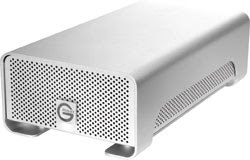
Finally, you will need extra storage space to keep all of this high-definition footage. The G-Tech G-RAID 2 comes in several sizes (2TB, 1.5TB, 1TB, and 500GB) and has three interfaces (USB 2.0, Firewire 400 and 800). G-Tech uses only SATA II drives with 16MB buffers for quick response time on HD playback from the timeline. Up to seven DV25 streams can be played back simultaneously, including four HDV, three DVCPRO HD, two 8-bit SD or one 10-bit SD streams. These RAID 0 drives are the perfect, reliable addition for anyone thinking about using their system for editing high-definition video footage.

Whether you've already upgraded to HD or not, standard video technology today is springing in leaps and bounds toward high-definition. Video camcorder sensors are becoming more and more sensitive, and their image processors are incredibly more efficient and accurate. And best of all, while this great quality is constantly rising, prices continue to tumble.


Source:http://www.internetvideomag.com/Articles_2007/120907_HiDefcamcorder_Guide.htm

Thursday, December 6, 2007

Digital Balance


It's easy to spend too much or too little when shopping for a camera

Before purchasing a digital camera, you need to have a clear understanding of what the camera will be used for. You can waste money by setting out to buy the most expensive camera on the market, or one with the most bells and whistles, or even the cheapest, says Tony Mino of Ritz Camera in Temecula.

Too many of his customers come through the door looking for a camera with the highest image quality, not realizing that they can get by with a much cheaper camera.

"They come in and they're looking for 12 megapixels, but they're not going to need it or use it," he said. "Eight megapixels is perfect for most people. It's going to give you excellent files, and you can do your editing without breaking the image apart."

Likewise, steer clear of those too-good-to-be-true $59.99 digital-camera specials at big-box stores, advises sales manager Shawn Pennell of Davis Camera in San Bernardino.

"The problem we find with the cheap cameras is you're throwing the thing away in six months or buying something else," he said. "Something either breaks or a part fails, and you're dead in the water. ... I'd definitely go with one of the top manufacturers to get the protection, the reliability and the warranty you need."

Many customers this year are buying their second or third digital camera. Mino says many people are surprised to find out that quality has improved while prices have dropped in the past few years.

Three years ago, he said, 5- to- 8-megapixel cameras sold for around $600. Now you can find better quality for less than half that price. He recommends that if you are using your camera mainly for family portraits and travel photos, you should stick with a name-brand camera with around 6-8 megapixels, 3x optical zoom and a 2.5-inch LCD screen. These cameras generally sell for $100 to $300.

If you're more interested in shooting landscapes, high-speed action, weddings or nature photos, you can easily spend $1,000 or more on attachments and high-powered lenses. "So many people ask me, 'What's the best camera?'" Mino said. "There is no answer to that. It's all up to personal preference. The wife might like the Nikon D40 and her husband will like the Rebel XTi.

"There's definitely a lot of things that go into it, and price doesn't seem to be much of the issue," he said. "They're seeing it as an investment, so they want the best money can buy."


Know the features

Megapixels

What it is: Megapixels measure image quality. The more pixels in the camera generally means the better the photo quality.

What to look for: In many cases, bigger is not necessarily what you want. Most amateur photographers won't see a difference in images made with a 6-megapixel camera versus a 10-megapixel camera. But there can be a big price difference.

Digital Zoom vs. Optical Zoom

What it is: Digital zoom enlarges a portion of the image but often sacrifices image quality. Optical zoom magnifies an image with an adjustment of the lens on your camera without reducing the quality. Go for the bigger optical zoom and ignore the digital zoom.

What to look for: Turn off the digital zoom feature. After images are made with digital zoom, you're stuck with them.

Live LCD and Image Review

What it is: This is one of the best features users find when switching to digital. Digital cameras come with an LCD screen that previews images. A live LCD allows viewing of the actual image before it's taken. This is a great help in composing photos.

What to look for: Bigger is better. Cameras with the bigger displays are now sacrificing the viewfinder--but you probably won't use it anyway.

Single Lens Reflex (SLR)

What they are: SLR cameras are bigger than pocket cameras but have more options. They have better quality in low light, focus faster, have more shutter speeds and lens settings, higher ISO and interchangeable lenses and flashes.

What to look for: These cameras are generally packed with features and the ability to expand.

Waterproof

What it is: Many manufacturers make waterproof cases for nonwaterproof digital cameras. Some digital cameras (including some by Pentax and Olympus) can go directly into shallow water without special housing.

What to look for: Unless you plan to shoot in shallow water, Southern Californians generally don't require waterproof cameras.

Source: http://www.pe.com/lifestyles/stories/PE_Fea_Daily_D_digital07.17b6cf2.html

FinePix F50fd Digital Camera


Digital photographers looking for a top-of-the line compact digital camera can now take advantage of the latest in Fujifilm's F-Series digital cameras with the 12-Megapixel FinePix F50fd.Following a long line of award winning F-Series models, the FinePix F50fd, like the FinePix F31fd and F40fd before it, offers consumers a super-compact digital camera that takes beautiful shots with the most advanced features and technology available, so that missing great shots is not an option.

Combining a 12-MegaPixel, 7th Generation Super CCD with a 3.0x optical zoom and a 2.7"; high-resolution 230,000 pixel wide angle view LCD, the FinePix F50fd is a compact powerhouse that incorporates all the features users have come to expect from Fujifilm's more advanced digital cameras. With the addition of Dual Image Stabilization, Face Detection 2.0 Technology with Automatic Red Eye Removal function, and ISO settings of up to ISO 6400, the F50fd takes compact digital cameras to the next level, arming users with a host of new features and enabling them to take pictures never before possible.

Face Detection 2.0 – The Next Generation

Fujifilm's proprietary Face Detection Technology also gets an upgrade in the F50fd with the arrival of Face Detection 2.0, featuring Automatic Red Eye Removal. As with the original version of Face Detection, it can detect up to 10 human faces in a scene in as little as 5/100's of a second, correcting focus, exposure, and white balance automatically, regardless of where subjects are located within the frame. Face Detection 2.0 adds to this technology by being able to identify faces at much more extreme camera angles than before. No longer does the camera need a head-on shot to identify a face, because now even a profile will do – with up to 90O movement in either direction for profiles, and up to 135O for leaning or lying down in either direction, for a total range of 270O.

Additional improvements to Face Detection 2.0 include a new Automatic Red-Eye Removal feature that automatically corrects red-eye directly after the shot is taken and then saves both the original and the corrected image file.

Dual Image Stabilization

To ensure that users achieve even greater blur-free pictures, the FinePix F50fd adds to Fujifilm's Picture Stabilization mode to create the improved Dual Image Stabilizationmode. This combines a mechanically stabilized CCD sensor with high ISO sensitivities for Total Anti-Blur protection. The combination of these two different approaches reduces the "blur"; effect from the photographer's hand-shake and subject movement even further to provide the highest quality digital pictures yet, with sharp, clean and clear results.

Not much light? Not a Problem!

All too often, digital photographers run into problems when taking pictures in low-light or dimly-lit situations and have to rely on the flash which can lead to over-exposed and washed-out shots. The FinePix F50fd builds on the great strides previous Fujifilm digicams have made with low light photography and allows users to effortlessly capture the moment as their eye sees it, with tremendous clarity and low noise, using Fujifilm's Real Photo technology. Thanks to the 7th generation FinePix Super CCD-HR chip and the RP Processor II, the Finepix F50fd can utilize ISO settings of up to ISO1600 at full resolution and an amazing ISO 6400 at reduced resolution1, capturing stunning images even in low light while preserving the natural color and clarity of the shot.

In addition to these advancements, the FinePix F50fd possesses a number of other impressive features:

  • Portrait Enhancer Mode: Mimicking a professional photo studio setting, by using Face Detection and preset camera settings, Portrait Enhancer minimizes fine lines and small skin blemishes for smooth, natural looking portraits.

  • Dual Shot Mode: In this selectable mode, the FinePix F50fd quickly shoots two images in rapid succession -- one with the flash and one without – and saves both. This convenient function lets the user perform a comparison at their convenience and select the most pleasing image.

  • i-Flash Intelligent Flash: i-Flash (Intelligent Flash) detects subtle lighting differences within a scene and then varies the flash intensity accordingly. It also leverages the high sensitivity of the FinePix F50fd to enable the camera to use less flash, resulting in an image that displays pleasing, natural tones without a "washed-out"; effect. And with an automatic pop-up flash, it's always ready when you need it.

  • Full Manual Photographic Control: Gives the user total control with manual adjustment options for settings on the camera (resolution, ISO, aperture, shutter speed, etc), and is desirable by the photo enthusiasts/advanced photographers.

  • GUI Micro Thumbnail: A new playback feature that allows for viewing an index print on the LCD. The F50fd will show up to 100 images in micro form, then the control buttons are used to move over specific images and select them. This makes it easy to quickly find a single image by being able to jump to particular segments of images in the time sequence. So rather than using the left/right arrows to move through one image at a time, you can move up/down/left/right and then select the image you want to view. The back button takes you back to the thumbnail view in one step. The micro view lets you get close to the image you want, and then scroll to find the specific picture. As memory cards become larger, and devices become as much about sharing images as capturing them, this is a handy feature to enable the user to find specific images quicker.

  • IrSimpleTM: Infrared communication via IrSimpleTM technology for fast, easy wireless image transfer to a compatible device.

  • Special Scene and Blog Modes: The FinePix F50fd has 16 pre-programmed scenes, including a special underwater scene mode for use with a special underwater casing. In the Blog mode, the FinePix F50fd copies and automatically reduces the size of copied images for easy posting to a blog, Web page or as an attachment to email for easy sharing with friends and family while maintaining the original file.

  • xD / SD / SD-HC Compatible slot: The FinePix F50fd features a "xD/SD Compatible slot"; which accepts not only Fujifilm's traditional xD-Picture Cards but also Secure Digital (SD) and SD-High Capacity/SD-HC cards too.

  • Battery Life: Long-life rechargeable Li-ion battery (up to 230 shots).
Source: http://www.cameratown.com/cameras/detail_page_sql.cfm?productid=15764326

5 Megapixel Underwater Digital Camera

Under Water Digital CameraJaques Cousteau, Nemo and Marine Boy (boy we're getting old) eat your heart out! Most 'affordable' underwater cameras are great fun, but their price tag tends to mean that whilst they're fun, the pictures are not that brilliant. Well this Underwater Digital Camera is a whole new ballgame. We took it to Egypt (at great personal sacrifice) to put it to the test, and the results speak for themselves. It was easy to use, we know this because we didn't bother to read the instructions (though you should of course), and the 5 Megapixel resolution was excellent. As well as stills it shoots video at 18-20 FPS (frames per second) QVGA, and will take SD cards up to 2GB. A TV output cable lets you play your movies and pics on the box, the waterproof housing is safe down to at least 15 metres, and of course you can take it out of its case and use it as a land camera. You can even use it as a webcam if that's your bag. It uses just two AAA batteries, so no matter where you are you can keep the power going. All in all this is a deeply impressive underwater digital camera.

Features

  • A Digital Aqua Pack, waterproof to 15m.
  • A digi-cam and waterproof case.
  • 5.0 Mega Pixels CMOS Sensor (2560 x 1920).
  • 16MB Flash Memory.
  • 8 x Digital Zoom.
  • A video mode of 18-20 FPS at QVGA with sound.
  • A voice recorder.
  • A memory card slot that supports SD cards up to 2GB.
  • A TV output and cable.
  • A CD Rom.
  • A driver for webcam functionality.
  • Ulead Photo Software.
  • A pouch and strap.
  • A user manual.
  • Suitable for ages 16 years+.
  • Requires a USB cable (included).
  • Requires 2 x AAA Batteries (not included).
  • Size: 11.5 x 8 x 6cm.
Source: http://www.iwantoneofthose.com/new-arrivals/5-megapixel-underwater-digital-camera/index.html